
WAN 2.2 Animate – Move & Replace in One Workspace
Upload a character image and a reference video, then choose Move to animate the image or Replace to swap a character into the scene. WAN 2.2 Animate turns your footage into high-fidelity character videos with motion transfer, lip-sync and consistent lighting – without local GPU setup.
What Is WAN 2.2 Animate?
A unified AI model for character animation and replacement
WAN 2.2 Animate is a video-to-video model from the WAN 2.2 family that turns any reference video into a driver for character motion, facial expressions and timing.
What Is WAN 2.2 Animate?
WAN 2.2 Animate is a video-to-video model from the WAN 2.2 family that turns any reference video into a driver for character motion, facial expressions and timing.
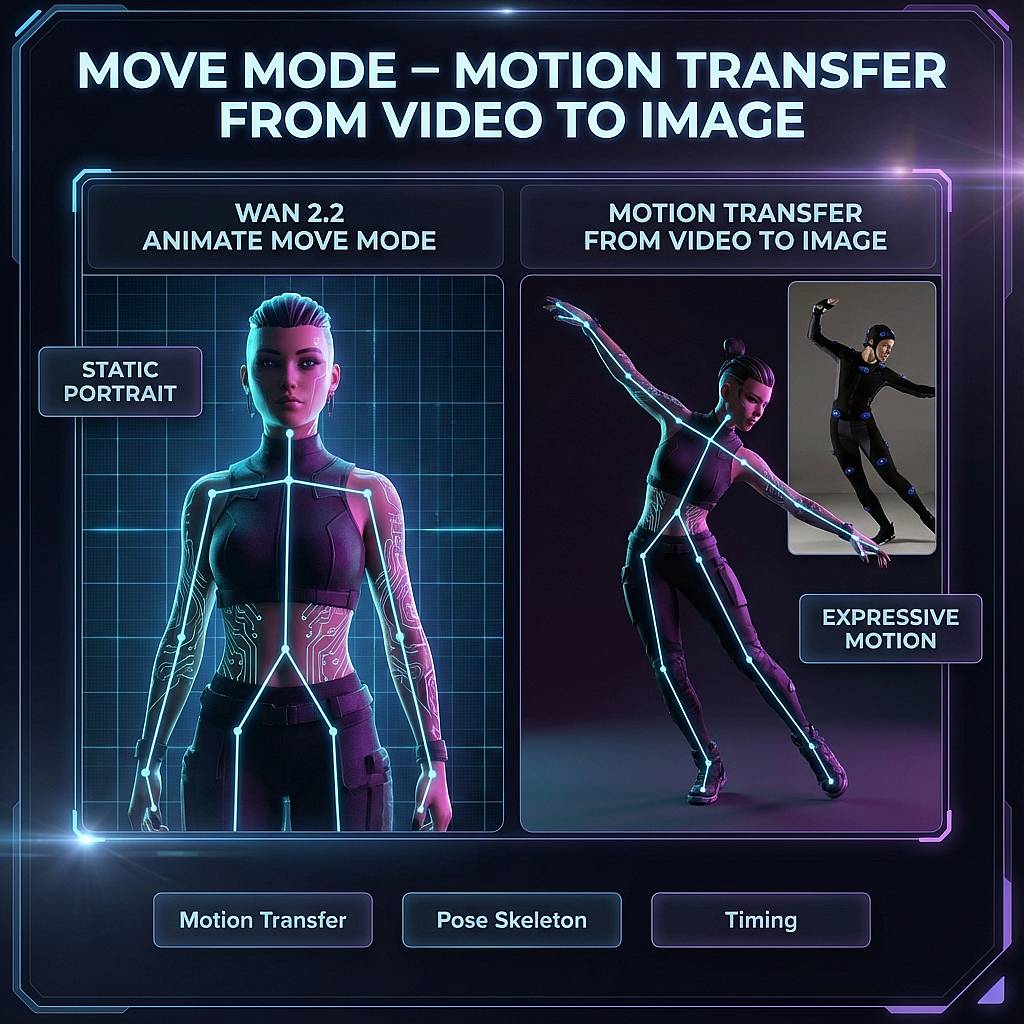
- Character Animation – In Move mode, WAN 2.2 Animate takes a static character image and a motion reference, then generates a new video where your character performs the same gestures, head moves and rhythm.
- Character Replacement – In Replace mode, the model keeps the original video’s background and camera, but swaps the on-screen character for the one in your reference image. It’s suited for face swaps, avatar placements and creator stand-ins.
- Unified Model – Both Move and Replace are part of the same Wan-Animate 2.2 model, giving consistent behavior across animation and replacement tasks and simplifying your prompt, safety and resolution settings.
- Works with Existing Tools – WAN 2.2 Animate underpins many popular workflows: ComfyUI graphs, Hugging Face Spaces, online WAN-Animate demos and local GGUF builds. This page focuses on making those capabilities easy to use from a browser-first hub.
WAN 2.2 Animate Move & Replace Features
Two modes, one unified WAN-Animate model for character animation and replacement
WAN 2.2 Animate uses a unified video-to-video model to replicate motion, pose and expressions from a reference video. The Move and Replace modes give you two ways to apply that motion: animate a static image, or swap a character into existing footage.
WAN 2.2 Animate Move & Replace Features
WAN 2.2 Animate uses a unified video-to-video model to replicate motion, pose and expressions from a reference video. The Move and Replace modes give you two ways to apply that motion: animate a static image, or swap a character into existing footage.
Why Creators Choose WanX Ai Hub for WAN 2.2 Animate
From rough tests to repeatable Move & Replace workflows
Run WAN 2.2 Animate Move and Replace from one place, compare outputs and keep the presets that actually ship in your projects.
One Place for WAN-Animate Traffic
Stop bouncing between individual demos and partial workflows. WanX Ai Hub puts WAN 2.2 Animate Move & Replace, WAN 2.5 video and other WAN 2.2 routes into a single workspace tuned for AI video creators.
Move & Replace Side-by-Side
Use the same image and driver clip to generate both Move and Replace versions, then keep whichever sells the shot better – motion transfer animation, character swap, or both.
Prompt & Workflow Library
Save WAN 2.2 Animate prompts, durations and aspect ratios as presets. Start from curated Move / Replace templates for talking heads, dance loops, UGC ads and VTuber intros instead of filling a blank form every time.
Bridge Online Tests and Local Pipelines
Use the hub to nail down settings before you invest in ComfyUI graphs, GGUF downloads or self-hosted WAN 2.2 Animate servers. Once the workflow works here, mirror the parameters into your own stack.
Creator-Friendly Credit Model
You don’t need your own 2.2 Animate cluster. Start with trial credits, figure out how long your Move / Replace clips really need to be, then scale with predictable pay-per-run pricing.
Built Around Real Projects, Not Benchmarks
The UI, examples and docs focus on real creator jobs: YouTube intros, client ads, VTuber avatars and social experiments, not just model benchmarks and research samples.
Test Move & Replace with trial credits, then pay per run
Start by running WAN 2.2 Animate Move and Replace with trial credits so you can validate motion templates, clip durations and character swap quality. When you’re confident in the workflow, top up credits and pay per successful video-to-video job.
Run Your First WAN 2.2 Animate Move or Replace Clip
Upload a character image and a reference video, pick Move for motion transfer or Replace for character swap, and generate your first WAN 2.2 Animate clip. Use presets to keep the settings that actually work for your channel, clients or campaigns.
WAN 2.2 Animate Move & Replace FAQ
Key questions about motion transfer and character replacement
WAN 2.2 Animate at a Glance
Practical numbers for real Move & Replace workflows
Know what WAN 2.2 Animate Move & Replace can handle before you start burning credits.
Video-to-video character animation and replacement at 720p resolution
Supports character motion transfer and face/character swap from a single driver clip
Optimized presets for short hooks, mid-length edits and longer character performance tests
What Creators Say About WAN 2.2 Animate Move & Replace
Early adopters using WAN 2.2 Animate for character animation, face swap and AI video workflows.
Ivy Chen
VTuber & StreamerMove mode finally gave my avatar natural motion without a full mocap setup. I prototype gestures here first, then bring the best clips into my stream overlays.
Daniel Foster
Video Editor for AdsReplace mode is the first AI face swap that survived client review. Background, lighting and pacing all stay intact, so nobody complains that it looks fake.
Ivy Chen
VTuber & StreamerMove mode finally gave my avatar natural motion without a full mocap setup. I prototype gestures here first, then bring the best clips into my stream overlays.
Daniel Foster
Video Editor for AdsReplace mode is the first AI face swap that survived client review. Background, lighting and pacing all stay intact, so nobody complains that it looks fake.
Ivy Chen
VTuber & StreamerMove mode finally gave my avatar natural motion without a full mocap setup. I prototype gestures here first, then bring the best clips into my stream overlays.
Daniel Foster
Video Editor for AdsReplace mode is the first AI face swap that survived client review. Background, lighting and pacing all stay intact, so nobody complains that it looks fake.
Ivy Chen
VTuber & StreamerMove mode finally gave my avatar natural motion without a full mocap setup. I prototype gestures here first, then bring the best clips into my stream overlays.
Daniel Foster
Video Editor for AdsReplace mode is the first AI face swap that survived client review. Background, lighting and pacing all stay intact, so nobody complains that it looks fake.
Newsletter
Junte-se à comunidade
Assine nossa newsletter para receber as últimas notícias e atualizações